

GPT2Markdown
Save ChatGPT conversations in Markdown format.
Open source
- Website
- chrome.google.com
- Category
- Chatbot › AI Chatbot
- Pricing
- Open source
- Platforms
- browserExtension
About Chatbot tools
Chatbot tools help you accomplish a range of AI-powered tasks. GPT2Markdown is one option in this category.
About GPT2Markdown
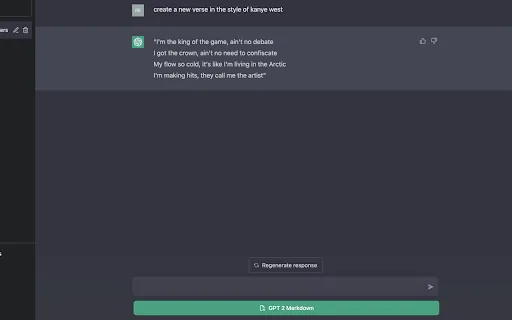
Export your conversations with ChatGPT to Markdown ~ by @EmergingTechGuy on Twitter Tired of having to manually export your ChatGPT conversations to your notes, Notion, etc?😓 Not anymore! The GPT2Markdown extension helps you export your conversations with ChatGPT in 1 click⚡️ Features: 🔥 export your conversation with ChatGPT to Markdown format 🔥 use ChatGPT's auto-labelling to name you files 🔥 open source 🔥 1 click You can then import your conversation to a tool like Notion, which helps you store it digitally! Or, you can store them in a dedicated folder on your external hard drive. It's up to you! ℹ️ Do note that there may be instances where you activate the extension and will need to reload the page for the GPT2Markdown button to appear! This is an open-source project; the source code is publicly available for anyone to review and contribute to at « https://github.com/0xreeko/gpt2markdown » We only ask for bare minimum permissions and do not collect any user data. Post your feedback/comments - i'd love to know if it's been helpful to you & see if there's any room for improvement per your feedback :) ~ @emergingtechguy (on Twitter)
Getting started
- Visit GPT2Markdown's website to create an account or start using it
- Available on: browserExtension
- Check the pricing page for the plan that fits
Screenshots


Related tools
Compare GPT2Markdown with other Chatbot tools such as ModelsLab, Music.AI before you pick one.