

Productivity · AI Productivity Tools
Smart Input
Save time by storing frequently used text snippets for instant access.
Paid
- Website
- chrome.google.com
- Category
- Productivity › AI Productivity Tools
- Pricing
- Paid
- Platforms
- browserExtension
About Productivity tools
Productivity tools help you accomplish a range of AI-powered tasks. Smart Input is one option in this category.
About Smart Input
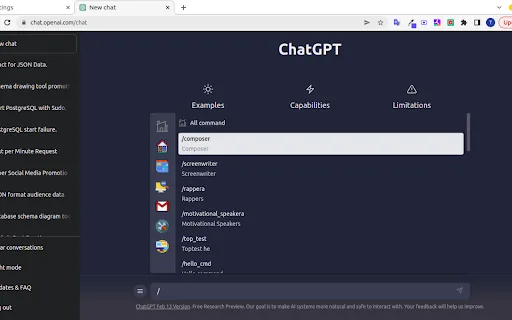
ChatGPT with Prompt curated template. Quickly save and reuse prompt instant anytime. ChatGPT Prompt Plus is an extension that allows you to save and manage your prompt library, making it easy to call. You can create your prompt template with great flexibility, such as adding parameters to the template. Additionally, you can set each parameter's details, including default value and input type, enabling you to create high-quality and adaptable prompts. 🔥 Key Features: 💾 Manage prompt library and reuse it easy 🎹 Set your own hotkeys to your prompts 🗃️ Prebuilt Prompt template from awesome prompt 📂 Organize your prompts with categories and custom icons 🔍 Easy find prompt with Popup search 🧰 Bind Parameters with Prompt 🎨 Many Variant parameter type 💻 Simple and easy-to-use interface How it works: 1. Go to the prompt setting page by clicking on the hamburger icon near chat input of ChatGPT to access the main menu. Click on 'Prompt' to begin creating a new prompt template. 2. Add your prompt in prompt setting and fill your prompt detail. 3. Type a forward slash (/) in the chat input to open the prompts list menu. Select the prompt you want from the list. Click on the chosen prompt to…
Getting started
- Visit Smart Input's website to create an account or start using it
- Available on: browserExtension
- Check the pricing page for the plan that fits
Screenshots


Related tools


Compare Smart Input with other Productivity tools such as ModelsLab, ChatGPT Cross-Platform App before you pick one.