

Code & IT · AI Developer Tools
ChatGPT Prompt Manager
Manage prompts and generate contextual responses in the browser.
Paid
- Website
- chrome.google.com
- Category
- Code & IT › AI Developer Tools
- Pricing
- Paid
- Platforms
- browserExtension
About Code & IT tools
Code & IT tools help you accomplish a range of AI-powered tasks. ChatGPT Prompt Manager is one option in this category.
About ChatGPT Prompt Manager
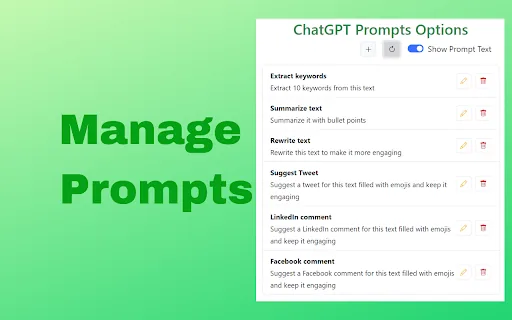
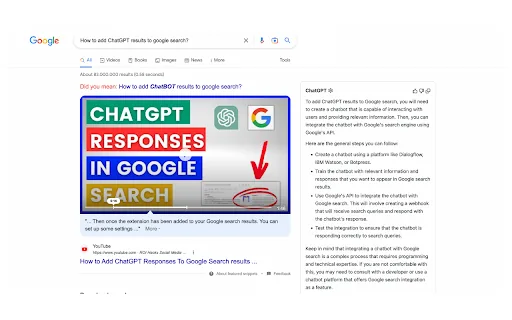
Use ChatGPT Prompts along with web page's context. Take your browsing experience to the next level with ChatGPT Prompts! Customize your prompts by adding, editing, or deleting them and saving them in your browser. Get started quickly with default prompts such as extract keywords, summarize, and rewrite, Suggest Tweet, LinkedIn comment and Facebook comment all powered by the advanced capabilities of ChatGPT. Directly execute your prompts against selected text on the web page or against the main content of the page using ChatGPT's cutting-edge natural language processing technology. You can copy the results of your prompts with ease. ChatGPT Prompts can act as a single app for multiple mini task apps with the help various prompts. Install ChatGPT Prompts powered by ChatGPT to start experiencing smarter browsing like never before!
Getting started
- Visit ChatGPT Prompt Manager's website to create an account or start using it
- Available on: browserExtension
- Check the pricing page for the plan that fits
Screenshots


Related tools



Compare ChatGPT Prompt Manager with other Code & IT tools such as ModelsLab, NeuralGen.ai before you pick one.